


IE浏览器在高版本的win10系统下已经被微软删除了快捷方式。只能打开EDG浏览器
由于内网的特殊性,部分业务必须使用IE进行打开。所以需要将IE调用出来
对于高版本的windows10、11。微软将IE11的打开方式删除了,但是本体还是在C:\Program Files\Internet Explorer\iexplore.exe下
edg浏览器有兼容IE11的模式但是有30天期限。
可以使用类似沙盒模式强制打开IE,但是由于系统版本问题,沙盒下的IE11的兼容性设置和部分设置无法使用脚本修改
本质上打开的ie带有edg调用插件,将插件删除后可以解决收藏夹打开依旧跳转至edg
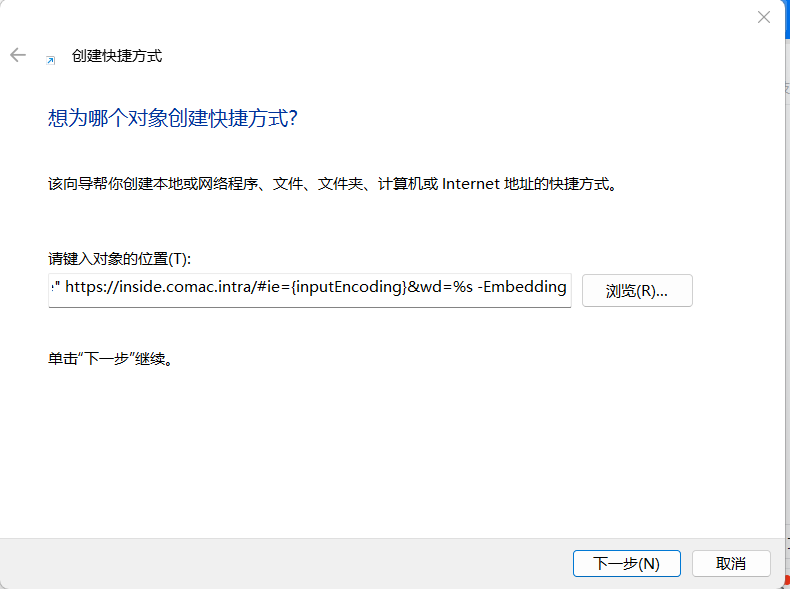
解决方案:
强制添加参数启动IE,在桌面新建快捷方式,对象位置输入:
"C:\Program Files\Internet Explorer\iexplore.exe" https://inside.comac.intra/#ie={inputEncoding}&wd=%s -Embedding
设定主页为
https://inside.comac.intra
也可以编辑脚本运行自动创建快捷方式
@echo off
setlocal

:: Define the path to Internet Explorer and the URL you want to open
set "IE_PATH=C:\Program Files\Internet Explorer\iexplore.exe"
set "TARGET_URL=https://inside.comac.intra/#ie={inputEncoding}&wd=%s -Embedding"

:: Get the path to the desktop for the current user
set "DESKTOP=%USERPROFILE%\Desktop"

:: Create a temporary VBScript file to create the shortcut
set "VBS_FILE=%TEMP%\CreateShortcut.vbs"

:: Write the VBScript code to the temporary file
(
echo Set oWS = WScript.CreateObject^("WScript.Shell"^)
echo sLinkFile = "%DESKTOP%\IE11.lnk"
echo Set oLink = oWS.CreateShortcut^(sLinkFile^)
echo oLink.TargetPath = "%IE_PATH%"
echo oLink.Arguments = "%TARGET_URL%"
echo oLink.Save
) > "%VBS_FILE%"

:: Run the VBScript to create the shortcut
cscript //nologo "%VBS_FILE%"

:: Clean up - delete the temporary VBScript file
del "%VBS_FILE%"

endlocal
评论